Scan History and the Activity Log in DeDup 1.5.3 for Android: what gets saved
When a scan ends, DeDup saves one short record of it. Scan History and the Activity Log are two screens that read those same records. This post lists what a record holds, where it lives and what it leaves out.
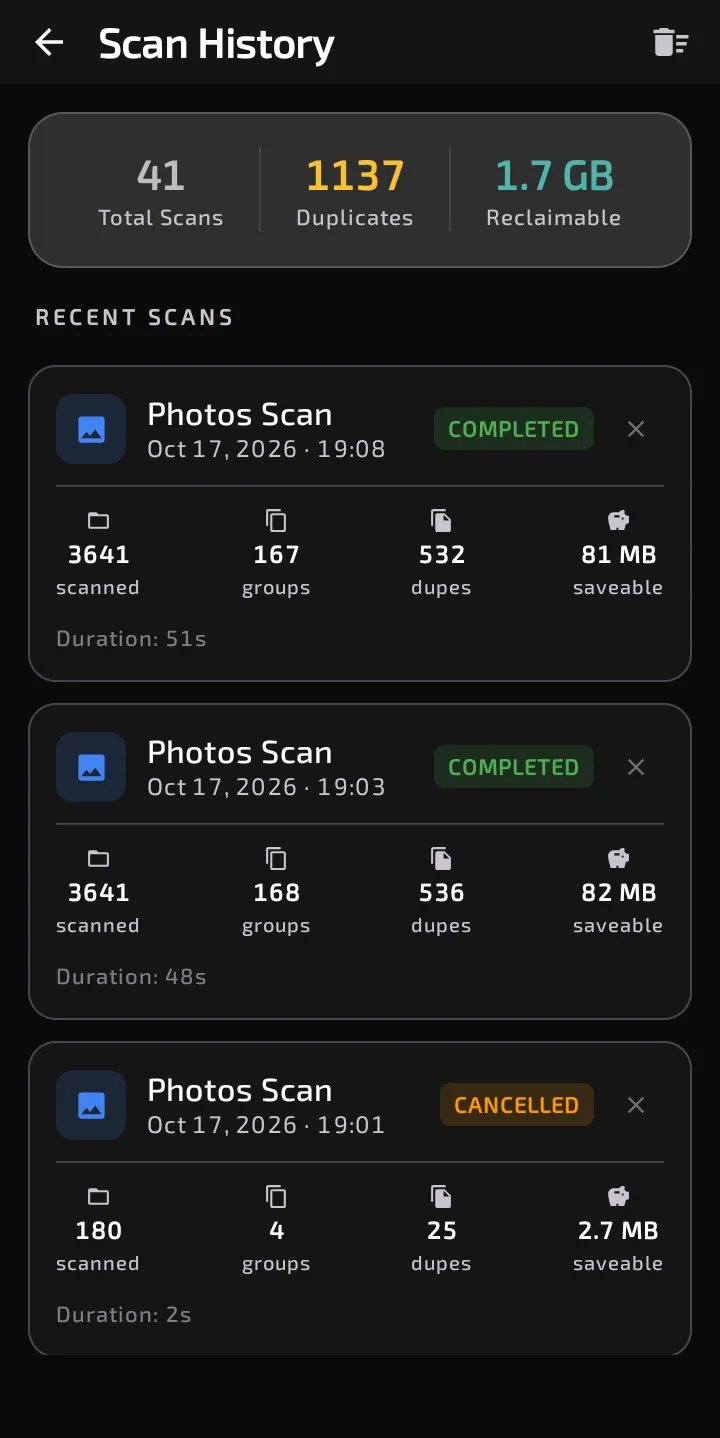
Scan History: totals at the top, then one card per scan with its status, counts and duration.
Where to find them
Scan History has a tile on the Dashboard (its label reads "Log") and a card in Storage Insights. The Activity Log is a card in Storage Insights. Its description says "Review your recent scan and cleanup activity". In 1.5.3 it lists the same scan records as Scan History. I found no separate record of deletions behind it.
What a record holds
Each record has these fields, and no others:
- an ID;
- the type of scan: Photos Scan, Videos Scan, Documents Scan, APKs Scan, or File Scan;
- the start time and how long the scan took;
- how many items were scanned;
- how many duplicate groups were found;
- how many duplicates: in each group, everything except the first item;
- reclaimable bytes: the combined size of those duplicates;
- a status: COMPLETED, CANCELLED or FAILED.
The record is written when the scan ends, including when you tap Stop or the scan fails. For photo scans, "scanned" counts photos that could be processed. A photo that couldn't be decoded isn't counted.
What each screen shows
Scan History opens with a summary card: Total Scans, Duplicates and Reclaimable. Each is a plain sum over all records, and Reclaimable shows a dash when the sum is zero. Because it adds each scan's figure, duplicates that are still on the phone can be counted again by the next scan. Below that are cards, newest first, with the scan type, date and time, status, four counts (scanned, groups, dupes, saveable) and the duration.
The X on a card removes that one record immediately, with no confirmation in the code. The sweep icon in the top bar asks "Clear All History", with the warning "This will permanently delete all scan records."
The Activity Log shows one line per record: the scan type, a relative time (JUST NOW, hours, YESTERDAY, days, then a date once it's over a week old) and text like "Scanned N files · N duplicates found · size reclaimable", with "Cancelled" or "Failed" added when relevant. It has no delete controls. In the dark theme the top shows a weekly summary: reclaimable bytes and scan count for the last 7 days. In the light theme it shows the heading "Scan History" and a record count instead.
Where it's stored, and what it leaves out
Records sit in DeDup's database on the phone. That database is encrypted, with its key kept in Android's encrypted preferences, and the app's backup rules exclude it from backup and device transfer.
A record doesn't contain photo names, paths or addresses, thumbnails, the files you deleted, or the settings used for the scan, such as the similarity value or excluded folders.
Other screens read these records too. The Dashboard's total reclaimable figure and the Storage Health score both draw on them, so clearing history changes those numbers.
Separately, when a scan completes, DeDup sends a usage-analytics event through Firebase with the scan type, items scanned, duplicates found, reclaimable bytes and duration. Clearing history only removes the local records.
Scope of this post
Checked against: DeDup 1.5.3 source code (Android).
Not tested on a device: how the screens look in each theme, whether older records survive every app update, and what Firebase receives in practice. The fields, screens and storage setup were read from the code.
Screenshots were captured on a DeDup 1.5.3 development build on Android 15 (Moto g34 5G), and show only settings and empty or summary screens.