How Agent Mode finds and deletes files in DeDup 1.5.3 on Android
Agent Mode is a chat-style screen in DeDup 1.5.3 on Android. You describe what to look for, by typing or by voice, and it scans your files and groups matches. It never deletes on its own: you select files, review a list, and confirm.
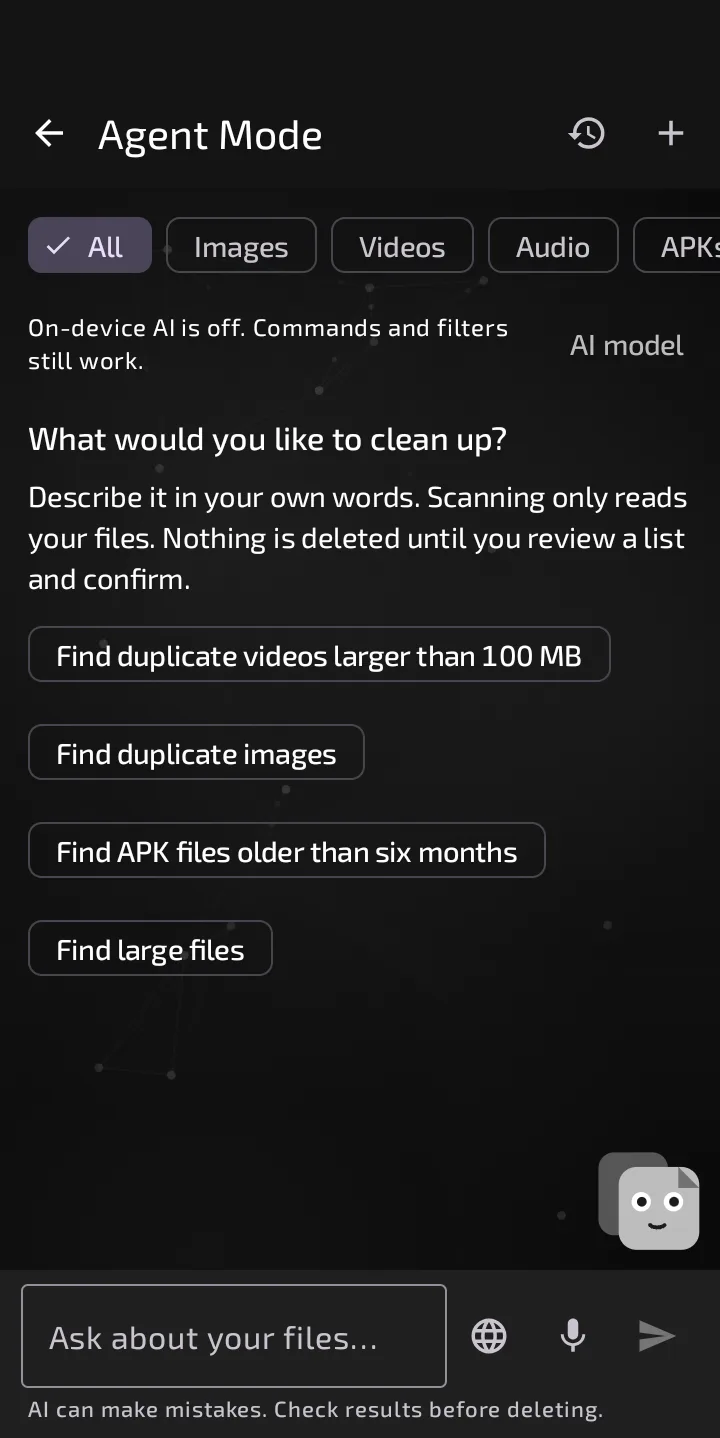
The Agent Mode start screen, with example requests and the note that nothing is deleted until you review a list and confirm.
Giving it a request
Type in the box ("Ask about your files...") or tap the microphone. The empty screen suggests requests such as "Find duplicate images" and "Find large files". A filter bar narrows results to All, Images, Videos, Audio, APKs, PDFs, Documents or Other.
Agent Mode asks for photo, video and audio access first. PDFs, APKs and documents also need All Files access.
Simple requests (scan, filter, sort, cancel) are handled by built-in rules, in English only. Anything else goes to an optional AI model, if you've downloaded one with the "AI model" button. The app says the download needs internet once and requests are then processed on your device. Without a model you get "I didn't understand that". The model can only answer with a fixed set of commands, and none deletes. It receives your request and a short summary of the filter, not file names or results. The footer reads "AI can make mistakes. Check results before deleting."
Voice
"Voice languages" offers two engines.
- Offline voice models (the default). You download a model once, about 40 MB according to the app, and speech is then recognised inside the app. That engine's code has no network code. Built-in commands are English.
- Phone's speech recognition. DeDup asks for offline English recognition. Without an offline pack you get an error, not a silent retry online. A code comment adds that without an on-device recogniser, the system's default service may send audio to its own backend, so DeDup doesn't promise on-device processing here.
What it can find
- Files by type, size or age, such as "larger than 100 MB". "Large" with no number means 100 MB or more, and the reply says so.
- Exact duplicates: grouped by size, then confirmed by a full SHA-256 of their contents. Names are ignored.
- Similar images, only among photos DeDup has already indexed. The reply notes similar isn't identical.
- Sorting by size, date or name.
The list shows the first 200 matches and flags partial results. A vague request like "clean everything" gets a question back: "I won't delete anything based on a general request."
Review and delete
Select files, then tap "Review deletion". The dialog tags each file "Duplicate" or "Only copy" and says: "These files are deleted permanently. DeDup can't restore them." A review covers up to 500 files, and you must leave at least one copy of each duplicate group. Tap "Delete N files" to go ahead.
Before asking the system, DeDup re-reads each file and the copy being kept, and skips anything that changed or went missing. On Android 11 and newer, the system then shows its own delete prompt listing the files. On Android 10 it's per-file consent, and on older versions DeDup deletes directly under the permission you granted. PDFs, APKs and documents only delete with All Files access. Deletion is permanent. DeDup's Trash screen exists, but nothing in the scanners sends files to it in 1.5.3.
Afterwards DeDup re-reads the files and reports "Deleted and confirmed", "Skipped" and "Could not be deleted"; freed space counts only files confirmed gone.
What's kept
History keeps your requests only, and the app says results and file lists aren't saved. The code keeps up to 30 sessions of up to 50 requests, each cut to 200 characters. That storage is excluded from cloud backup and device transfer in the app's backup rules.
Scope of this post
Checked against: DeDup 1.5.3 source code (Android).
Not tested on a device: voice recognition, any AI model download or its answers, scan times, and the system delete prompt on any Android version.
Screenshots were captured on a DeDup 1.5.3 development build on Android 15 (Moto g34 5G), and show only settings and empty or summary screens.